 Chrunos
Download Bandcamp Music in 2026: 7 Ways (FLAC, Free, iPhone)
Do you want to download the best quality of music from Bandcamp? You have come to the right place.
Some converter sites promising 320kbps FLAC from a track you never bought. That’s not how Bandcamp works.
The public stream is 128kbps MP3, and no downloader can add quality that was never there.
I tested the free methods in November 2026 — including the ones that failed. Here’s the rule that decides everything: music you bought, music the artist gives away, and music you can only stream are three different problems.
This guide covers all three, with seven methods, a format cheat sheet, the legal answer, and a ten-second test that exposes fake 320kbps files.
How to Download Bandcamp Music: Quick Answer
If you bought the album, use Method 2. It’s lossless, it’s free (you already paid), and it takes about a minute.
If the artist offers a $0 “Name Your Price” download, Method 2 covers that too.
If the track is streaming-only, pick a capture method. They all top out at 128kbps MP3.
| Method | Best for | What you actually get | Cost | Legal |
|---|---|---|---|---|
| 1. MP3 Ripper Shortcut | iPhone, iPad, Mac — one track | 128kbps MP3 | Free | Personal use |
| 2. Official Download | Music you bought, or $0 releases | FLAC, ALAC, WAV, MP3 320, AAC, Ogg, AIFF | Free or already paid | ✅ 100% |
| 3. Tampermonkey Script | Desktop browser, albums | 128kbps MP3, with per-track and bulk buttons | Free | Personal use |
| 4. Online Downloader | A quick one-off track | 128kbps MP3 | Free | Personal use |
| 5. DevTools | Desktop, zero installs | 128kbps MP3 | Free | Personal use |
| 6. yt-dlp | Albums, artist pages, batch | 128kbps MP3 with tags and artwork | Free | Personal use |
| 7. Allavsoft | Desktop GUI, batch | 128kbps MP3 re-encoded | $19.99–$69.99 | Personal use |
If a site promises 320kbps from a Bandcamp stream, it’s re-encoding 128kbps. Method 5 and the quality section show you how to prove it.
Method 1: MP3 Ripper Shortcut (iPhone, iPad, Mac)
The MP3 Ripper shortcut is the fastest way to grab a single Bandcamp track on an Apple device. You don’t need to download a third-party app. Just add the shortcut to your Shortcuts app on your iPhone, iPad, or Mac.
How to use the shortcut
Step 1. Copy a track URL from Bandcamp website or app.
Step 2. Open the Shortcuts app and tap to run MP3 Ripper shortcut.
Step 3. Wait for the download to finish, then choose where to save the MP3 — Files or your Music library.
Note: You can edit the shortcut to specify a preferred location to save the downloaded files, so you will never get prompted.
Limitations
- 128kbps MP3 only — the same ceiling as every other stream-capture method
- Single tracks only, no albums or batch downloads
Method 2: Official Downloads — Purchases and Name Your Price
I’m treating these as one method because they end in the same place: Bandcamp’s own download page, with the same formats and the same DRM-free files. Only the trigger is different.
Part A: Music you bought
Step 1. Log in to Bandcamp.com and click your avatar → Purchases. Your Collection works too.
Step 2. Find the release and click Download.
Step 3. Open the format dropdown and pick one: MP3 V0, MP3 320, FLAC, AAC, Ogg Vorbis, ALAC, WAV, or AIFF.
Step 4. Save the ZIP, unzip it, and check the tags and artwork before you delete the archive.
For a single track, Bandcamp gives you the file directly instead of a ZIP.
Where else your downloads live
- Post-purchase page — the page you land on right after checkout
- Receipt email — every purchase includes a download link, but those links can expire
- Purchases / Collection — the reliable route, available forever
- Bandcamp app — Collection → Downloads tab, for offline listening only
Which format should you pick?
Bandcamp’s official format guide covers every option. Here’s the practical version.
| Format | Best for | Trade-off |
|---|---|---|
| FLAC | Archiving and home libraries | Larger files; some players need support |
| ALAC | Apple lossless libraries | Works well in Apple’s ecosystem |
| MP3 320 | Phones, cars, general use | Lossy, but universally compatible |
| MP3 V0 | Smaller files with good quality | Variable bitrate; some hardware prefers 320 |
| WAV / AIFF | Editing and production | Huge files, inconsistent metadata |
| AAC / Ogg | Specific players and workflows | Less universal than MP3 |
For most people: FLAC for the archive, MP3 320 for the phone.
One reality check: Bandcamp accepts uploads up to 24-bit/48kHz. “Lossless” means lossless relative to the artist’s upload, not automatically a high-resolution master.
iPhone, iPad, and Android
On iOS, tap the download link in your receipt or from the mobile browser, as Bandcamp’s iOS instructions describe. The files arrive as a ZIP in the Files app.
Tap to unzip, then open the tracks in a local-file player. You cannot import them directly into Apple Music — sync from a computer or use a player that reads Files.
On Android, download the ZIP, unzip it, and move the tracks to your Music folder. Any local player will pick them up.
Re-downloads, expired links, and missing receipts
- Expired email link: log in and use the Purchases page, or use Bandcamp’s re-download guide to request a fresh link.
- Purchase missing: check your spam folder, then add the email you used at checkout under Settings → Fan.
- Huge discography throwing 429 errors: download album-by-album from your Collection, as Bandcamp’s 429 guidance recommends.
- Download codes: these allow only a few downloads and expire quickly. That’s different from a purchase.
Bulk-downloading a collection: Batchcamp
If you have years of purchases, Batchcamp is the best browser extension I’ve found. It adds checkboxes to your Collection and Purchases pages, then queues everything you select in your chosen format.
It’s purchase-only, it never touches your login or payment details, and the current version (2.2.0, September 2026) supports pause, resume, retry, and filename templates. Keep the concurrency low so you don’t trigger Bandcamp’s rate limits.
Part B: Name Your Price at $0
Step 1. Open the album or track page and click Buy Digital Album or the Name Your Price field.
Step 2. Enter 0.
Step 3. Enter your email if the artist requires it. Some releases don’t ask.
Step 4. On the next page, choose your format — including FLAC if the artist enabled it.
Step 5. Download the ZIP and unzip it.
How to find free releases
- Browse Bandcamp’s Discover section by genre and look for “Name Your Price” or a $0 minimum
- Google
site:bandcamp.com "name your price" ambient(swap the genre) - Check small labels — many offer entire discographies at $0
- Watch for “$3 or more” — that’s not free
What you actually get
The artist decides. Some $0 releases include FLAC, ALAC, and WAV. Others are MP3-only. Either way, the files are DRM-free, and the download comes from Bandcamp, not a third-party ripper.
One more thing: a Name Your Price release may not show up in your Collection. Keep the download link or save the files somewhere safe.
Support the artist when you can
Bandcamp takes 15% of digital sales, dropping to 10% after an artist passes $5,000 in a year. Physical sales are 10%. On Bandcamp Fridays, Bandcamp waives its share entirely — the remaining 2026 date is December 4.
That’s the real “free download” story: the artist chose to give it away. Pay a few dollars when you can.
Method 3: Tampermonkey Script (Desktop Browser, Albums)
If you want a download button on every Bandcamp page, this is the cleanest free option I found. It’s a small userscript that pulls the same 128kbps stream the player uses.
Step 1: Install Tampermonkey
Install Tampermonkey for Chrome, Edge, Firefox, or Safari. It’s the standard userscript manager.
Step 2: Install the script
Install Bandcamp download mp3s (single + bulk) from GreasyFork.
The script adds a small 💾 button next to each track and a 🔗💾 button at the top of the album for bulk downloads.
Step 3: Download a track or album
Step 1. Open any Bandcamp album or track page.
Step 2. Click 💾 next to a track, or 🔗💾 to grab the whole album.
Step 3. Approve the multiple-download prompt if your browser shows one.
The script spaces downloads one second apart and names files with track numbers, artist, and title.
What it handles
- Single tracks and full albums
- Bulk downloads from the album page
- Automatic filenames
Limitations
- 128kbps MP3 only — again, that’s the source
- No embedded metadata or artwork; you’ll need a tag editor afterward
- Chrome may ask for permission to download multiple files
- Bandcamp layout changes can break the buttons until the script updates
A quick safety note
Userscripts run inside Bandcamp pages, so only install ones you can read. This script is short enough to review in a minute. It doesn’t ask for your credentials and only downloads the public preview URLs.
If you’d rather not install anything, Method 4 or Method 5 does the same job manually.
Method 4: Online Downloader (Ssbandcamp)
For a single track with no install, an online Bandcamp downloader is still the fastest route. Most of them are clones with ads, so test before you trust.
The one that worked for me in November 2026 was Ssbandcamp.
How to use it
Step 1. Copy the Bandcamp track or album URL.
Step 2. Paste it into the box and click Download.
Step 3. Complete the captcha if it appears.
Step 4. Pick the format and save the file.
What I found
The site’s lookup returned the correct track list for an album and the correct title, artist, duration, and artwork for a single track. Its download endpoint produced a live 128kbps MP3 stream.
The free tier has friction: ads, a captcha, and a limit of two albums per day. The final file is served through a separate ad-supported domain. That’s typical for this category, but it’s worth knowing before you paste a URL.
Limitations
- 128kbps MP3 only
- Captcha and ads
- Two albums per day on the free tier
- Can break when Bandcamp changes its page structure
- Not suitable for a whole library
Verdict: fine for one track, not for regular use. If you download more than a few songs a month, install the userscript instead.
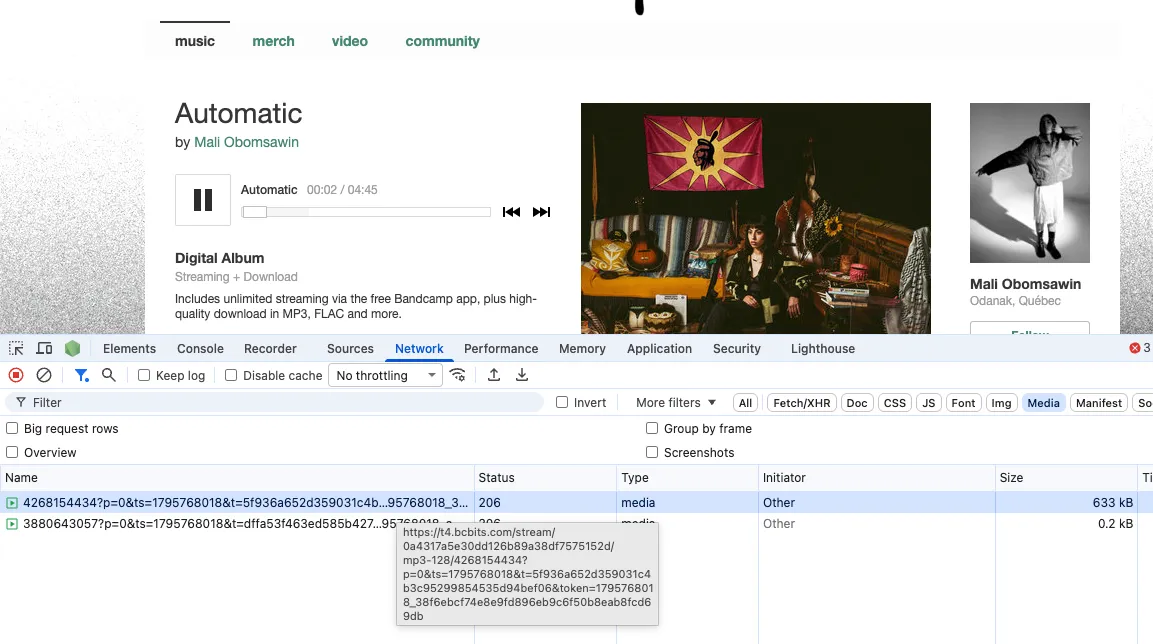
Method 5: DevTools (Desktop, Zero Installs)
Yes, the DevTools trick works. I tested it and downloaded a 4:45 track as a 4.5MB MP3 — exactly 128kbps, as expected.
This is the method to use when you don’t want to install anything and only need one track.
The page-source way
Step 1. Open the Bandcamp track page in a desktop browser.
Step 2. View the page source. In Chrome, press Cmd+Option+U (Mac) or Ctrl+U (Windows). In Safari, enable the Develop menu first.
Step 3. Search the source for mp3-128.
Step 4. Copy the full https://…bcbits.com/stream/… URL that follows.
Step 5. Paste it into a new tab. The MP3 plays; use Save Page As or the browser’s download button to save it.
The Network-tab way
Step 1. Open DevTools → Network.
Step 2. Filter by Media and press play on the track.
Step 3. Right-click the audio request → Open in new tab.
Step 4. Save the file.
Limitations
- The URL contains a time-limited token. If you get a 403, reload the page and grab a fresh one.
- One track at a time.
- No tags or artwork.
- Desktop browsers only.
The upside: it proves the quality ceiling. The file in the page source is mp3-128, and that’s what every other stream tool is downloading.
Method 6: yt-dlp (Albums, Artist Pages, Batch)
yt-dlp has native Bandcamp support for tracks, albums, artist pages, and Bandcamp Weekly. It’s the best free way to turn a whole Bandcamp album into MP3 files if you’re comfortable with a terminal.
I tested this on macOS with yt-dlp 2026.10.26. Single tracks, albums, and artist pages all came back as mp3-128.
Install
brew install yt-dlpOn Windows:
winget install yt-dlpDownload a single track
yt-dlp "https://artist.bandcamp.com/track/track-name"Download an album with tags and artwork
yt-dlp -x --audio-format mp3 --embed-metadata --embed-thumbnail \
  -o "%(album)s/%(track_number)02d - %(title)s.%(ext)s" \
  "https://artist.bandcamp.com/album/album-name"
Download an artist’s page
yt-dlp -x --audio-format mp3 --embed-metadata --embed-thumbnail \
  "https://artist.bandcamp.com"
Be careful with that last one. An artist page can contain hundreds of releases.
What it handles
- Tracks, albums, artist pages, and Bandcamp Weekly
- ID3 tags, track numbers, and embedded artwork
- Folder templates and batch queues
Limitations
- 128kbps MP3 only — Bandcamp doesn’t expose FLAC streams publicly
- Purchase-gated or private tracks need cookies
- Custom domains can throw SSL errors
- Some releases return “No video formats found” because Bandcamp isn’t exposing a public stream for that track. Try the track’s own URL; if it still fails, there’s nothing to download.
Update it properly
If you installed with Homebrew, use:
brew upgrade yt-dlpyt-dlp -U doesn’t work on Homebrew installs.
Method 7: Allavsoft (The Only Paid Option)
If you want a desktop app with a queue, no terminal, and no browser scripts, Allavsoft is the paid option I recommend.
It’s the only paid tool in this guide. Everything else is free.
Step 1. Install Allavsoft for Mac or Windows.
Step 2. Copy one or more Bandcamp URLs.
Step 3. Click Paste URL. Allavsoft detects the audio streams.
Step 4. Choose MP3 as the output format.
Step 5. Click Download. Files land in your chosen folder with tags and artwork.
What it handles
- Tracks, albums, and artist pages
- Batch downloads
- Output conversion to MP3, M4A, WAV, and more
Limitations
- 128kbps MP3 only — the same source cap as everything else
- Converting 128kbps to WAV or FLAC doesn’t improve quality
- Free trial, then licenses from $19.99; the lifetime license is around $69.99 (often discounted — check the current price)
Affiliate disclosure: the Allavsoft link above is an affiliate link. If you buy through it, I earn a small commission at no extra cost to you. I only recommend it because it’s the most reliable GUI option I’ve used.
The Three Bandcamp Scenarios (Read This First)
Bandcamp doesn’t have one download problem. It has three, and mixing them up is why most guides are useless.
1. You purchased the music
This is the easy one. When you buy a release, Bandcamp gives you a download page with every format the artist uploaded. The files are DRM-free — no encryption, no watermarks, no expiration.
You can re-download them from your account at any time. This is the only scenario where you get true lossless audio.
2. The artist offers “Name Your Price” at $0
Thousands of artists let you name your price, including zero. You go through Bandcamp’s checkout, enter your email if the artist requires it, and land on the same download page as a paid purchase.
The formats depend on the artist. Some offer FLAC, some only MP3. I checked Cloudkicker’s The Discovery while writing this: $0 minimum, and the download page offered FLAC, ALAC, WAV, AIFF, MP3 320, MP3 V0, and Ogg.
3. The music is streaming-only
No download button. The artist hasn’t enabled downloads, or the release is streaming-only by choice.
In this case, the only thing available is the public stream. Bandcamp’s help center confirms that free streams are MP3-128. Every tool in Methods 1 and 3–7 captures that same file.
One nuance: if you bought an item, the Bandcamp app streams it at MP3-V0 (about 250kbps) on Wi-Fi. That’s better than the browser, but it still isn’t lossless. Download the files if you care about quality.
FLAC vs 128kbps: What Quality You Actually Get
Here’s the honest comparison.
| Source | Quality | Format |
|---|---|---|
| Bandcamp purchase | Up to 24-bit/48kHz, artist-dependent | FLAC, ALAC, WAV, AIFF, MP3 320 |
| Name Your Price $0 | Artist’s choice | Often FLAC, sometimes MP3 only |
| Browser stream | 128kbps | MP3 |
| App stream (purchases, Wi-Fi) | ~250kbps VBR | MP3 V0 |
| Any capture tool | 128kbps | MP3 |
The rule is simple: quality comes from the source, not the downloader.
Re-encoding a 128kbps MP3 to 320kbps or FLAC adds bytes. It doesn’t add detail. A converter that labels a 128kbps stream as “320kbps” is lying to you.
How to check a file in ten seconds
ffprobe -v error -show_entries format=bit_rate -of default=nw=1 file.mp3If the output says 128000, the file is 128kbps no matter what the website promised.
You can also sanity-check the file size: roughly 1MB per minute at 128kbps, and about 2.4MB per minute at 320kbps. If a “320kbps” album track is 3MB for four minutes, it isn’t 320.
The only real upgrade
Buy the release, or find a Name Your Price release that offers FLAC. That’s it. No downloader, converter, or “AI enhancer” can reconstruct the audio that Bandcamp never sent.
If you need more legal lossless sources, see FLAC download websites.
Is Downloading Bandcamp Music Legal?
Short version: purchases and $0 Name Your Price downloads are explicitly fine. Stream capture is a personal-use gray area, and redistribution is not okay.
Here’s the more precise version.
Purchases. Bandcamp gives you DRM-free files and tells you to download them. Personal use is permitted.
Name Your Price at $0. The artist chose to allow it. You’re using Bandcamp’s own checkout and download page.
Streaming-only tracks. Bandcamp’s Terms of Use grant users a personal, non-commercial license to use and reproduce content. The same terms prohibit commercial use, redistribution, and violating restrictions attached to the content. So a personal offline copy is the defensible case. Uploading it, sharing it, or monetizing it is not.
This isn’t legal advice, and copyright rules vary by country. But the practical line is clear: keep it personal, don’t redistribute, and buy the record if you keep coming back to the artist.
Bandcamp’s cut is 15% on digital sales (10% after $5,000 in a year) and 10% on physical. On Bandcamp Fridays, it’s 0%. That’s a better deal for artists than most streaming platforms — which is why the “just buy it” advice isn’t just legal cover.
Troubleshooting
| Problem | Cause | Fix |
|---|---|---|
| Email download link expired | Time-limited link | Log in → Purchases, or request a fresh link from the expired-link page |
| Purchase missing from account | Different payment email | Add it under Settings → Fan |
| “429 Too Many Requests” | Huge discography queued at once | Download album-by-album from Collection; lower Batchcamp concurrency |
| yt-dlp returns 404 | Private or removed release, or custom-domain SSL | Update yt-dlp; try --no-check-certificates as a last resort |
| yt-dlp says “No video formats found” | No public stream exposed for that track | Try the track’s own URL; if it still fails, buy it or skip it |
| Download is 128kbps despite a “320kbps” tool | Bandcamp’s stream cap | Verify with ffprobe; no tool can fix it |
| iPhone won’t add files to Apple Music | iOS restriction | Use a local-file player, or sync from a computer |
| ZIP won’t open on iPhone | Files app needs a tap to extract | Tap the ZIP in Files; install a file manager if needed |
| DevTools URL returns 403 | Token expired | Reload the page and copy a fresh mp3-128 URL |
| Online tool asks for captcha or refuses | Daily cap or ad flow | Use the userscript or DevTools instead |
Frequently Asked Questions
Q: Can I download Bandcamp music for free? A: Yes, in two legal ways. Buy a “Name Your Price” release for $0, or download music you already purchased. Streaming-only tracks can be captured at 128kbps, but that’s a personal-use gray area.
Q: Can I get FLAC from a Bandcamp stream? A: No. Bandcamp’s public stream is 128kbps MP3. FLAC is only available through a purchase or a $0 download the artist enabled.
Q: Do Bandcamp downloads have DRM? A: No. Purchases are DRM-free — no encryption, no watermarks, no expiration. You can play them on any device and convert them to any format.
Q: Can I re-download my purchases? Do the links expire? A: You can re-download anytime from your Purchases or Collection page. Email links can expire, but your account page always has access.
Q: How do I download a whole Bandcamp album? A: If you bought it, use the Download button and choose a format — you’ll get a ZIP. If it’s streaming-only, use yt-dlp or the Tampermonkey script.
Q: How do I download Bandcamp music to my iPhone? A: Use the MP3 Ripper shortcut for streaming tracks. For purchases, download the ZIP into Files, unzip it, and play it in a local-file app. Apple Music doesn’t accept the files directly.
Q: Is downloading Bandcamp music legal? A: Purchases and $0 Name Your Price downloads are explicitly allowed. Capturing a stream for personal use is a gray area. Redistribution, uploading, or selling the files is not allowed.
Q: Why is my “320kbps” Bandcamp download only 128kbps? A: Because Bandcamp’s public stream is 128kbps. The tool re-encoded it or simply mislabeled it. Run ffprobe on the file and you’ll see the real bitrate.
Q: Do I need a Bandcamp account to download? A: Not always. Some $0 downloads only ask for an email. Purchases are tied to the email you used at checkout, and an account makes re-downloads easier.
Conclusion
Here’s the whole guide in one sentence: if you bought it, download the FLAC from your Purchases page; if the artist offers it for $0, use Name Your Price; if it’s streaming-only, accept 128kbps and pick the tool that fits your device.
My picks by situation:
- iPhone or Mac, one track: the MP3 Ripper shortcut
- You bought the album: official download, FLAC
- A big purchased collection: Batchcamp
- Streaming albums on desktop: the Tampermonkey script or yt-dlp
- One track, no installs: DevTools
- You want a GUI and don’t mind paying: Allavsoft
That’s how to download Bandcamp music without paying for a converter that can’t beat the source.
The one thing to remember: no Bandcamp downloader can give you FLAC from a 128kbps stream. Quality comes from the source. Buying the record is the only real upgrade — and the only one that pays the artist.
If a tool in this guide stops working, or you find a release that breaks yt-dlp, leave a comment below. I test these methods regularly and update the guide when Bandcamp or the tools change.