 Chrunos
5 Ways to Download Music from Tidal to FLAC [Hi-Res]
If you want to enjoy the high fidelity, lossless audio quality of Tidal music on your HI-Fi audio player, you can download Tidal music as FLAC. In this way, you can enjoy the lossless CD-quality and hi-res quality tracks from Tidal smoothly on any device even if the Internet connection is not stable.
In this article, I will show you 5 ways to download a single video\track\album\playlist from Tidal. You can even choose High Res quality for music tracks and 1080P for music videos. It is available for Windows, macOS, Linux, iOS, and Android. It is really downloading from the Tidal server, not recording the music.
Disclaimer: This is for private use only. You should not use this method to distribute or pirate music. You will need a Tidal subscription (Any subscription plan), expect the last method. It may be illegal to use this in your country, so be informed. This post contains affiliate links. If you make a purchase through these links, I may earn a small commission at no extra cost to you.
Download Tidal Music with Tidal-DL
Previously, I have shared a terminal-based tool Streamrip for downloading music from Tidal, Qobuz, Deezer, etc. For Windows users, you can simply download this Tidal Media Downloader Pro GUI program. No installation is required. After downloading, you can refer to the steps below to see how it works.
Step 1. Locate the downloaded Tidal-dl.exe file and run the program.
Step 2. Once the program is launched, go to link.tidal.com within the next 5 minutes to complete the setup.
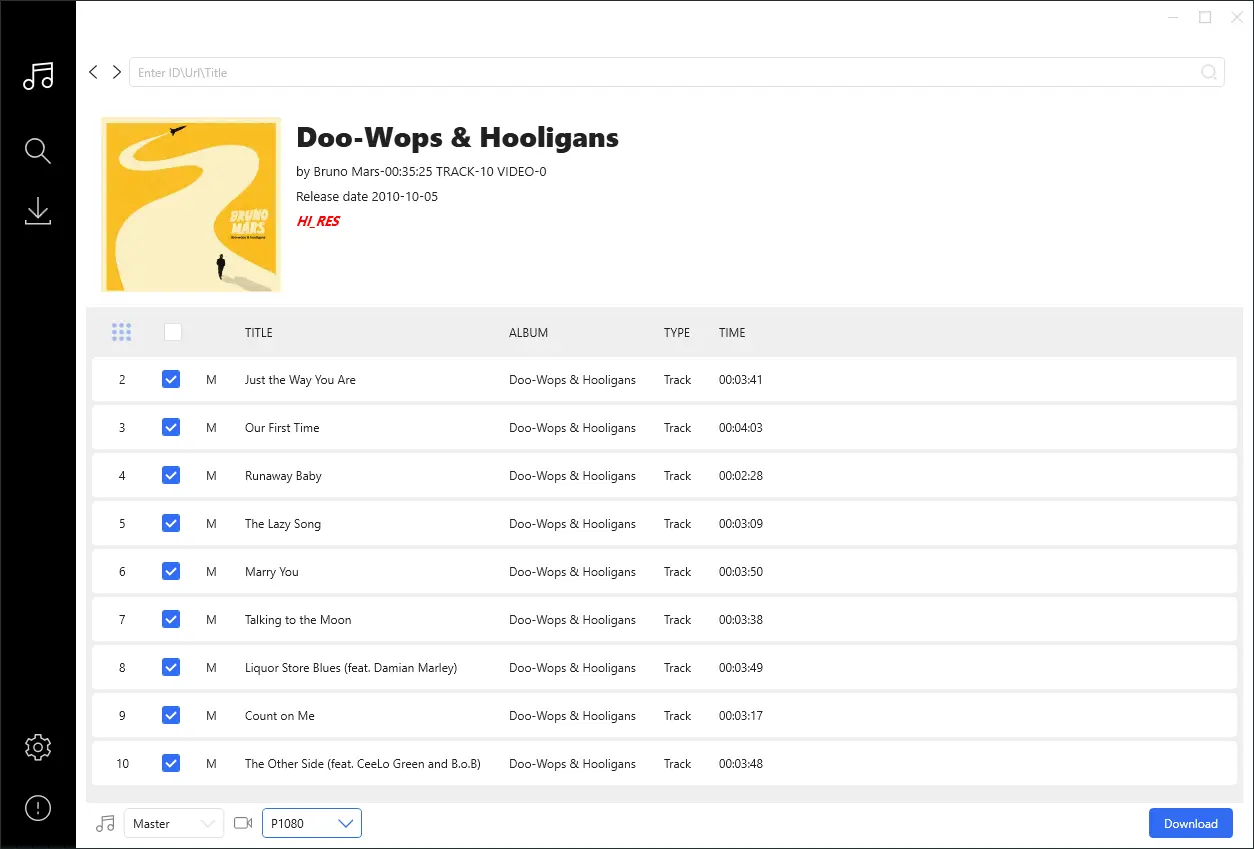
Step 3. Change the default settings if needed. After that, you can paste a single video\track\album\playlist link and press Enter.
Step 4. The program will get the info of the link and click the Download button to start downloading. From the bottom left, you can select the music quality from Master to Normal.
Note that high res quality is not available for all tracks. If you paste a playlist link, you can uncheck any of the tracks that you don’t want to download in that playlist.
This Tidal GUI downloader is the simplest way to download music from Tidal without needing a device code. If you have Python 3 installed on your Windows PC, you can also run this program from the command prompt to download music from Tidal.
Download Tidal Music on macOS- Terminal
Generally, Python is installed on a Mac, so you can easily install this program on your Mac. If your Mac does not have Python 3 and Pip3, be sure to install them first. If you want a Tidal GUI downloader for Mac, you can check Allavsoft for Mac.
Step 1. Open Terminal on your Mac.
Step 2. Run the following command:
pip3 install tidal-dl --upgrade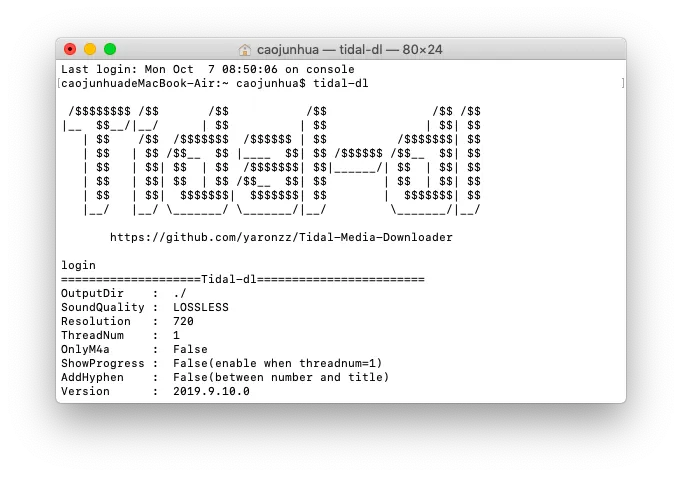
Step 3. When that is done, every time you want to use this program, just type “tidal-dl” to bring up the Tidal Media Downloader screen.
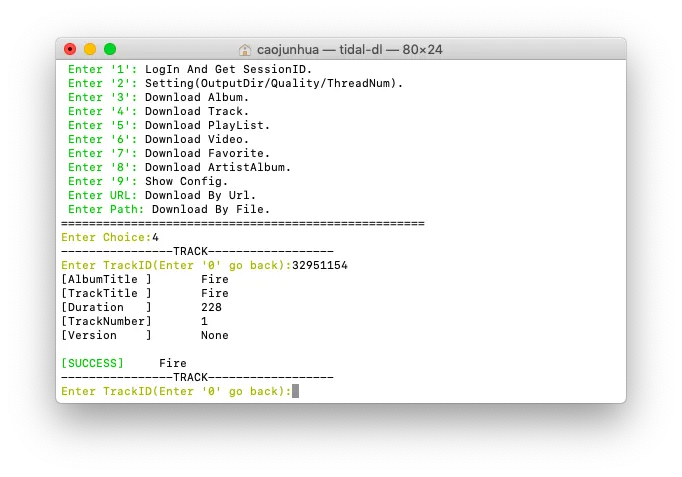
Step 4. As the instruction shows, type “1” to log in with your email and password for Tidal.
Step 5. Then type “2” to change the default settings if needed. Then you can type “4” and then track ID to download a Tidal track. Track ID means the 8-figure number at the end of the track URL.
Type the corresponding number to download the Tidal album, playlist, or video.
Epubor Tidal Downloader for Windows or Mac
Epubor Tidal Downloader is a program that lets you download music from Tidal. It allows you to download your favorite songs, albums, and playlists to M4A, MP3, or FLAC. Here are the steps for using Epubor Tidal Downloader:
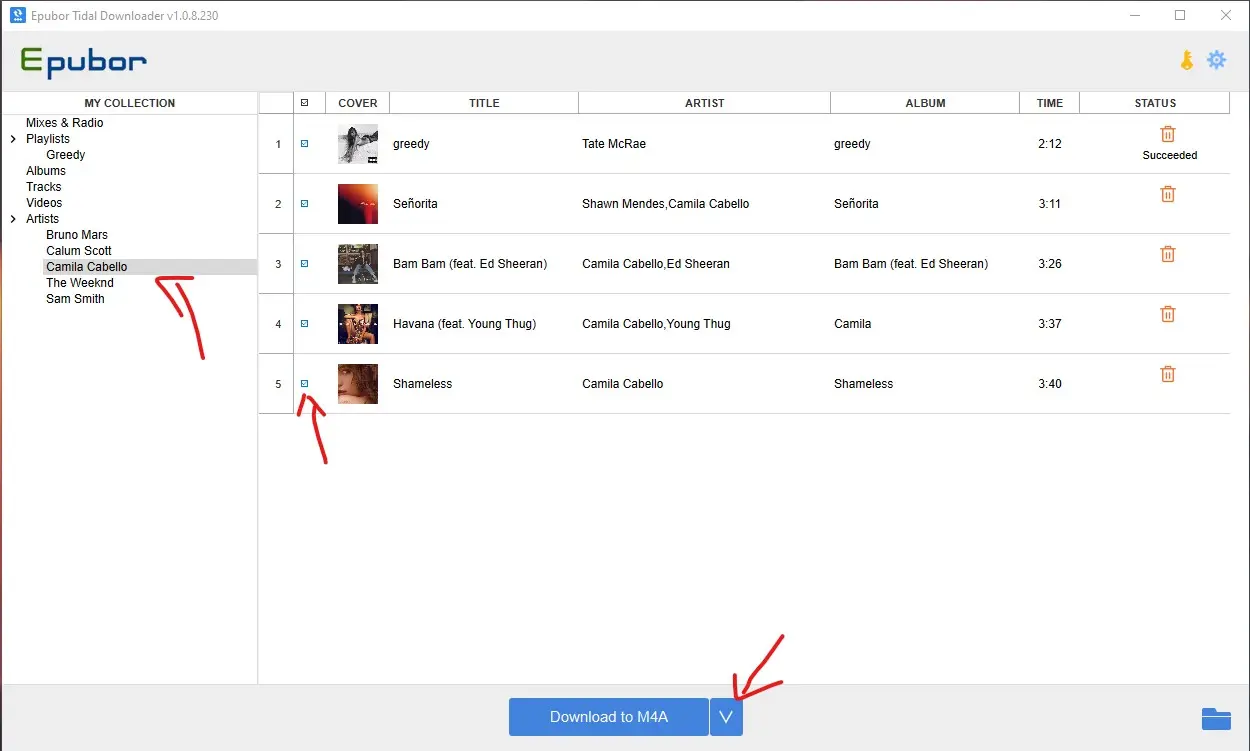
Step 1. Download and install Epubor Tidal Downloader on your PC.
Step 2. Launch the software and wait for it to load all your Tidal items. If you don’t have Tidal for Desktop app installed, it will prompt you to.
Step 3. Once fully loaded, you can add tracks from left penal for downloading.
Step 4. Select the output as M4A, FLAC, MP3, etc. Click the download icon to begin downloading the music into your PC.
Once the download is complete, locate the downloaded music in the output folder. You may also transfer the music to other devices or players that support the MP3 or FLAC formats.
Tidal Downloader Shortcut (Flow)
Our Premium plan offers a shortcut for iOS and macOS, Power Automate Desktop flow for Windows, and Automate Flow for Android (coming soon) to download Tidal songs to FLAC (Hi-Res).
To get them, you can join our Premium membership. Besides this shortcut, you will get all of our premium shortcuts and have access to our exclusive content.
Shortcuts is an app that lets you automate tasks on your iOS and macOS devices. Power Automate Desktop is a built-in app for automation app for Windows 11. On Android, you can use Automate app, which works like the Shortcuts app on iOS. The Tidal Downloader flow will soon be available for Android.
Once you have the shortcut, you can tap the Share button from the Tidal app and select this Tidal Downloader shortcut to rip Tidal songs on your iPhone. You can refer to the video below to see how it works.
Since it is system-based app, you can download songs on your iPhone without leaving the Tidal app. However, if you don’t like to pay, you can get the Chrunos Multi Downloader shortcut. It can download tracks from Tidal in lower quality.
Download High Quality Music from Tidal on Android
It is pretty much the to download Tidal music on Android, but first you need to install the Termux app, which allows you to run Python script and other scripts.
Step 1. Download and install Termux app. You can free download it from Google Play.
Step 2. Allow Termux to grant permission for your phone storage by typing the following command.
termux-setup-storage
Step 3. Run the following commands one by one to install Python and tidal-dl.
pip install --upgrade pip
pip install --upgrade tidal-dl
tidal-dl
pkg install python clang libjpeg-turbo ffmpeg zlib -y
Step 4. Now you can type the corresponding number to do what you want on a Mac. I highly suggest you change the output location by typing number 2.
Conclusion
You can download music from the Tidal server, not record it. With these programs, you can enjoy high-resolution or lossless music offline on any of your devices. If you want to download Tidal music to other formats instead of FLAC, you can use Allavsoft.
There is another open-source program called Streamrip that can also download music from Tidal and download music from Spotify, Deezer, and other streaming services, but it is a little bit more complicated than this.