Saving Pornhub videos to your phone is a huge pain.
Pornhub doesn’t give you a simple “Download” button. And most third-party apps are filled with ads.
But there’s a catch:
You still want to save those videos for offline viewing or resharing.
Here’s the deal:
I’ve tested 20+ free tools and apps to find the ones that actually work.
And in this guide, I’m going to show you exactly how to download Pornhub videos on both iPhone and Android using a safe, free shortcut.
Apple Shortcut for Downloading Videos from Pornhub
If you are on an iPhone, forget about the App Store. Most “downloader apps” are buggy and full of intrusive ads.
Instead, you can use a powerful iOS feature called Shortcuts. Specifically, a shortcut called Chrunos Multi Downloader.
Why this works:
It’s free. It saves videos straight to your Camera Roll, Files, or iCloud. Apple is strict about security. So if you’ve never used a third-party shortcut before, you might hit a wall.
It gets better:
You don’t need to be a hacker to fix this. You just need to run any shortcut once to “wake up” the system.
Time needed: 1 minute
- Prepare Your iPhone
Before we install the shortcut, we need to make sure your phone allows it.
- Import the Shortcut
Go to the Chrunos Multi Downloader page (search for it on Google or RoutineHub).
Tap “Get Shortcut.”
Your iPhone will ask if you want to add it. Tap Add Shortcut. - Download Your Video
Open Pornhub and find the video you want to save.
Copy the video URL.
Tap to run the shortcut Chrunos Multi Downloader.
What’s the bottom line?
The shortcut will run automatically. You might see a pop-up asking for permission to connect to API’s servers.
Tap “Always Allow”.
Once the checkmark appears, check your Photos app. Boom. The video is there.
“Is it safe to run a shortcut from a stranger?”
Here is the truth:
Shortcuts are generally safer than random apps from the App Store.
Why?
Transparency. You can actually open the shortcut and look at the code (the “actions”) yourself.
But there is a catch:
You still need to watch out for permissions. When you run a downloader shortcut, it should only ask for access to:
The Internet (to grab the video file).
Your Photos (to save the file).
Red Flag Warning 🚩
If a video downloader ever asks to access your Contacts, Location, or Microphone, delete it immediately.
A video tool has no reason to know who your friends are.
Download Pornhub Videos on Android
Seal app is an open – source video downloading tool for downloading videos on Android. It supports fetching and saving videos from multiple major video platforms. Although it’s not available on the app store, you can download it from GitHub.
Here are the simple steps to download porn videos on an Android device using the Seal app:
Step 1. Download the APK File
- Open the browser on your Android device and visit the download link.
- Locate the “Releases” section on the GitHub page. Select and download the latest stable – version APK file suitable for your device, such as the commonly used arm64 – v8a version.
Step 2. Install the APK File
- Go to your device’s “Settings”, and in the “Security” or “Privacy” options, enable “Install from Unknown Sources”.
- Find the downloaded APK file in the “Downloads” folder of your file manager, click to install it, and follow the on – screen instructions to complete the process.
Step 3. Copy the URL to the Target Video
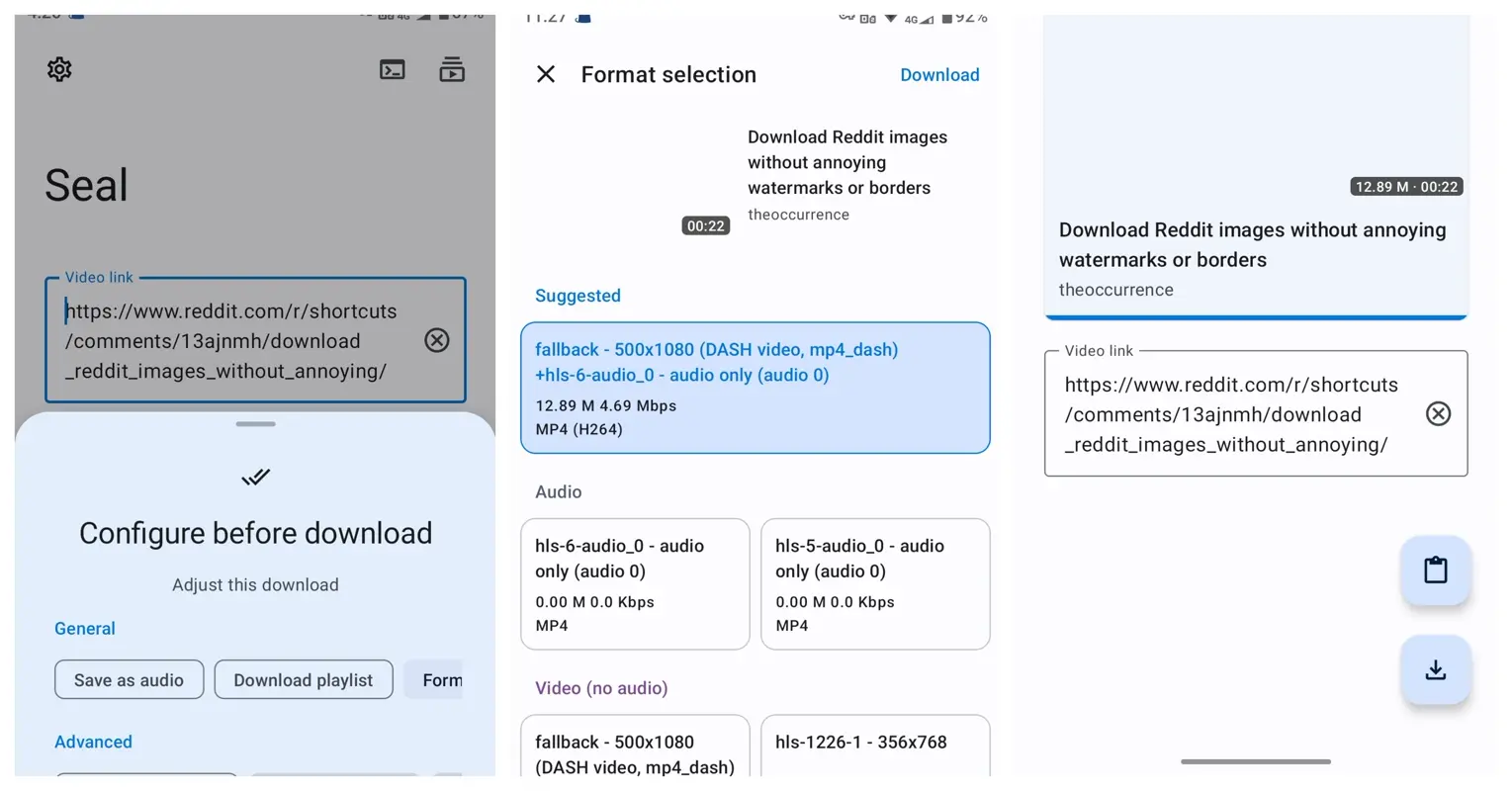
- Open your frequently used video platforms, like Pornhub or Xvideos, and find the video you want to download.
- Click the share button on the video page and select “Copy Link”.
Step 4. Download the Video
- Open the Seal app, paste the link into the designated input box, click the search or download button, and the download will start. You can check the progress during the process.
Step 5. View the Downloaded Video
- You can view the downloaded video in the “Download Completed” or “Local Videos” option in the Seal app, or find it in the photo album or file manager according to the default storage path.
Seal app also supports downloading porn videos that requires login by loading cookies. You may refer to this part.
Conclusion
That’s my step-by-step guide to downloading Pornhub videos in 2026. Using the Chrunos Multi Downloader on iPhone is the fastest, cleanest method I’ve found. If you want to download videos from other porn sites, you may check the PN Ripper shortcut.
Now I’d like to hear from you:
Which strategy from today’s post are you going to try first? Are you using iOS Shortcut or Android App?
Let me know by leaving a comment below.