I made a multi-source downloader shortcut, called Chrunos Multi Downloader. It is available for iOS and macOS to download music and videos from various platforms. Whether you’re looking to save your favorite tunes or grab that viral video, this shortcut has you covered.
Supported Video Platforms
Chrunos Multi Downloader shortcut can download videos from YouTube, Instagram, Threads, OK Video, Pinterest, Reddit, Rutube, Streamable, Tiktok, Tumblr, Twitch clips, Twitter, Vimeo, Vine, VK, and Bilibili. It will download videos in 1080P quality (best for iPhones) with rich metadata.
When you input a Tiktok video link, it will download the video without watermark. It can only download Twitch clips. If you want to download full Twitch Vods, you can check this post.
Supported Music Platforms
It can also download music from Apple Music, Spotify, Soundcloud, Tidal, Deezer, Napster, and YouTube Music. Later, I will update the shortcut to support more music platforms. You can also check our music downloader shortcuts collection.
Get the Shortcut
You can click the button below to import the latest version to your shortcuts library on iPhone or Mac. The shortcut was made on my Mac, so it saves videos to Files by default. You can edit the shortcut to save it to the Photo Album.
Update News
Version 3.3 Update:
- Add support for Pornhub.
- Improve video, music, images downloading.
- Add support for TikTok slideshows.
- Fix the video codec issue.
- Improve download speed.
Version 1.9 Update: Add Support for Facebook.
Version 1.8 Update: API fix.
Version 1.7 Update: Add support for a few more sites.
Version 1.5 Update:
- Support YouTube age restricted videos.
- Save videos to Photos instead of Files.
Version 1.4 Update:
Fix Instagram downloads error.
Version 1.3 Update:
Add update kit.
Version 1.2 update:
- Download music from Amazon Music and Pandora.
- Fix no URL specified error when downloading YouTube Music audio.
Version 1.1 update:
- Add Napster support.
- Fix URL encode issues.
Chrunos Downloader HQ Shortcut
If you’re after even higher quality video or music, consider upgrading to the Chrunos Downloader HQ shortcut. It allows you to download videos at its best quality available (up to 8K), and download music in lossless format, FLAC. Chrunos Downloader HQ Shortcut is available in our premium plan.
Chrunos Downloader for Windows
Windows 11 comes with an automation tool, Power Automate Desktop. It works like the Shortcuts app on iPhone or Mac. If you use Windows 10, you can free download this app on your PC. I have used it to make a Chrunos Downloader flow.
Unlike shortcuts, it is not that convenient to share my flows publicly for everyone to use. You may follow the steps below to import this Chrunos Downloader flow on your computer.
Web.InvokeWebService.InvokeWebService Url: $'''https://raw.githubusercontent.com/CodyChrunos/Shortcuts/refs/heads/main/chrunosmultidownloader.json''' Method: Web.Method.Get Accept: $'''application/xml''' ContentType: $'''application/xml''' ConnectionTimeout: 30 FollowRedirection: True ClearCookies: False FailOnErrorStatus: False EncodeRequestBody: True UserAgent: $'''Mozilla/5.0 (Windows; U; Windows NT 5.1; en-US; rv:1.8.1.21) Gecko/20100312 Firefox/3.6''' Encoding: Web.Encoding.AutoDetect AcceptUntrustedCertificates: False TrimRequestBody: True Response=> WebServiceResponse2
Variables.ConvertJsonToCustomObject Json: WebServiceResponse2 CustomObject=> update
IF update.pVersion = 1.1 THEN
    Clipboard.GetText Text=> ClipboardText
    Web.InvokeWebService.InvokeWebServicePost Url: update.api Accept: $'''application/json''' ContentType: $'''application/json''' CustomHeaders: $'''Content-Type: application/json''' RequestBody: $'''{\"url\": \"%ClipboardText%\", \"quality\": \"720\"}''' ConnectionTimeout: 30 FollowRedirection: True ClearCookies: False FailOnErrorStatus: False EncodeRequestBody: False UserAgent: $'''Mozilla/5.0 (Windows; U; Windows NT 5.1; en-US; rv:1.8.1.21) Gecko/20100312 Firefox/3.6''' Encoding: Web.Encoding.AutoDetect AcceptUntrustedCertificates: False TrimRequestBody: True ResponseHeaders=> WebServiceResponseHeaders Response=> WebServiceResponse StatusCode=> StatusCode
    Variables.ConvertJsonToCustomObject Json: WebServiceResponse CustomObject=> JsonAsCustomObject
    IF Contains(WebServiceResponse, $'''error''', True) THEN
        WebAutomation.LaunchEdge.LaunchEdge Url: $'''https://t.me/chrunoss''' WindowState: WebAutomation.BrowserWindowState.Normal ClearCache: False ClearCookies: False WaitForPageToLoadTimeout: 60 Timeout: 60
    ELSE
        IF IsNotEmpty(JsonAsCustomObject.url) THEN
            Web.DownloadFromWeb.DownloadToFolder Url: JsonAsCustomObject.url DestinationFolder: $'''C:\\Users\\Public\\Videos''' ConnectionTimeout: 30 FollowRedirection: True ClearCookies: False UserAgent: $'''Mozilla/5.0 (Windows; U; Windows NT 5.1; en-US; rv:1.8.1.21) Gecko/20100312 Firefox/3.6''' Encoding: Web.Encoding.AutoDetect AcceptUntrustedCertificates: False DownloadedFile=> DownloadedFile
        END
    END
ELSE
    WebAutomation.LaunchEdge.LaunchEdge Url: update.url WindowState: WebAutomation.BrowserWindowState.Normal ClearCache: False ClearCookies: False WaitForPageToLoadTimeout: 60 Timeout: 60 TargetDesktop: $'''{\"DisplayName\":\"Local computer\",\"Route\":{\"ServerType\":\"Local\",\"ServerAddress\":\"\"}}''' BrowserInstance=> Browser
END
Step 1. Click the Copy Code button above.
Step 2. Open Power Automate Desktop and create a new flow.
Step 3. In the new Power Automate flow, click on the Main and paste all the text you just copied.
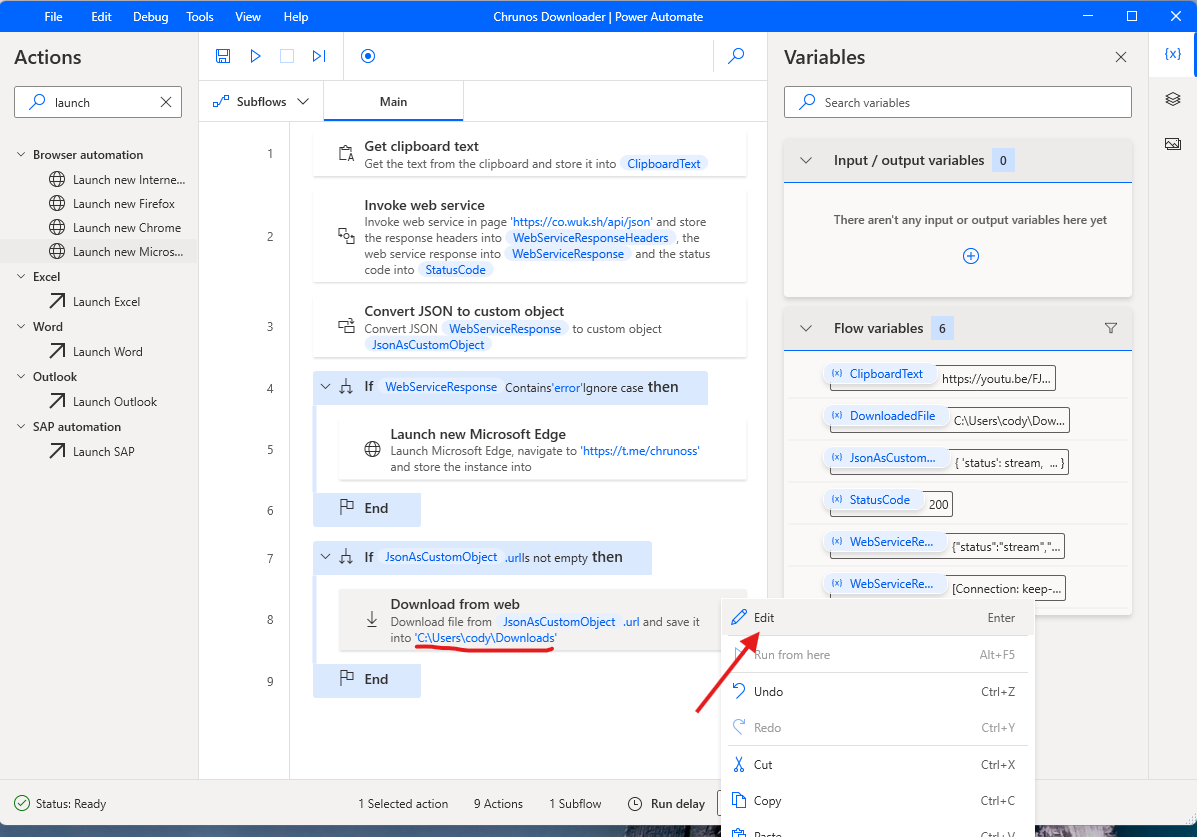
Step 4. It will automatically becomes actions in the flow. Edit the Download from web action and change the destination folder where you want to save the downloaded videos.
Step 5. Copy a video link and run this flow. You can also set a keyboard shortcut to run it.
Recently, I learned Power Automate as a desktop automation software. When I get to know better about it, I will update this flow. Currently, it can only download videos. Later, I will add all more features and make it supports more platforms.
When it fails to download a video, it will open our Telegram group in your browser, so you can report the URL that failed. When it does, don’t think it is a virus or something.
Chrunos Multi Downloader for Android
Automate is one of the best Shortcuts alternatives for Android. You can use it to automate a lot of things on your Android device. I have a flow to download videos from many platforms including YouTube, TikTok, Instagram, Streamable, etc.
The Automate app is free without ads. Once you downloaded it from Google Play Store, you can get this Chrunos Multi Downloader flow from the button below.
Within the Automate app, select the Chrunos Multi Downloader flow and tap “Start” to run it. Then this flow will be available in share sheet. Now, you can share a video to this flow and it will automatically download the video and save it to your Downloads folder.
You can also watch the video above to see how it works. I just started to use this Automate app recently. As I get to understand the app more, I will share more useful flows, so stay tuned.
Conclusion
With the Chrunos Multi Downloader, you can easily grab your favorite content from various platforms without any hassle. If something is not working or you want the shortcut to support another platform, be sure to leave a comment down below.
Additionally, you can also check yt-dlp for Mac to download media from multiple sources.
@Colin Golinghtly,
Get the updated version from this page.
Censorship is normally not perpetrated by the State, not some officious little coder, and not even a real coder at that.
You claim there is an update available yet when I accept the invite to get the update there is none forthcoming. Just to show this message comes from a human, all be it an obnoxious one, I’ve used an email address that will reach me if used.
I thought we had moved on from primitive updating. At the moment that’s my only criticism, overall the shortcut runs as expected.
Getting the error “Make sure to pass a Valid URL to the Get Contents of URL Action.